小任班长 发布的文章

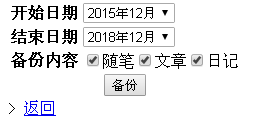
1. 备份cnblog内容

76706-nsv0c5lie4e.png

下载导出工具php文件

下载地址:https://github.com/BackTrackCRoot/cnblogs-to-typecho

使用说明

2. 填写数据库配置导入
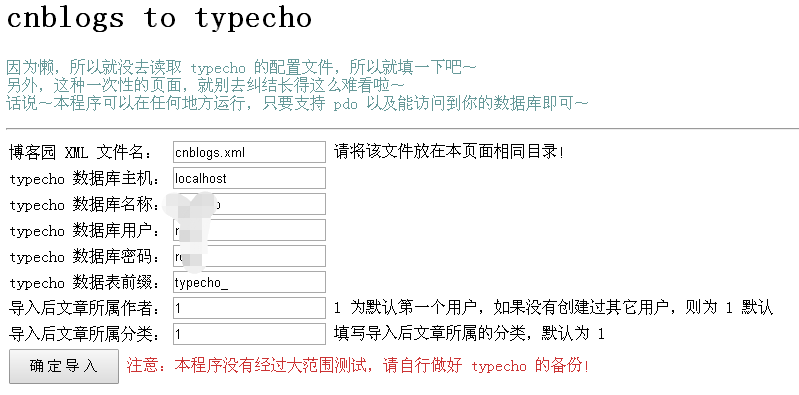
19380-mzvruh8jrs.png

3. 提示导入成功,发现博客导入成功!

45188-dkjf37mmrp7.png

注意事项:

如果提示,“It is not safe to rely on the system’s timezone settings”问题

第一行加入设置时区代码即可

<?php
ini_set('date.timezone','Asia/Shanghai');
if ($_SERVER['REQUEST_METHOD'] == 'POST')

开启了重写访问404找不到博文,是因为slug没值,通过下列语句更新,即可访问

update typecho_contents set slug = title where slug is null;

PHP2.4开启重写功能,修改配置文件
/etc/httpd/conf,找到对应的站点节点

AllowOverride All

对于低版本apache,需要引入对于的.so文件开启。

修改后重启apache

sudo service httpd restart 

验证是否开启成功

httpd -M

存在rewrite_module (shared),即表示开启成功!

提示无写入.htaccess文件是权限问题
chown -R apache:apache /var/www/html

如果保存设置时出现如下情况,重写功能检测失败,在你确保服务器配置没有问题的情况下,可以手动添加重写规则文件.htaccess到系统根目录,内容如下:

RewriteEngine On
RewriteBase /
RewriteCond %{REQUEST_FILENAME} !-f
RewriteCond %{REQUEST_FILENAME} !-d
RewriteRule ^(.*)$ index.php [L,E=PATH_INFO:$1]

99302-h8xuv57za88.png

更多介绍,参考官方论坛:
http://forum.typecho.org/viewtopic.php?f=4&t=10782&p=40833&hilit=%E9%87%8D%E5%86%99%E5%8A%9F%E8%83%BD%E6%A3%80%E6%B5%8B%E5%A4%B1%E8%B4%A5#p40833

访问网站后台页面,显示Missing Config File 首页无异常 环境lamp,其它环境类似

解决方法:

检测php.ini的open_basedir 属性,注释掉

; open_basedir, if set, limits all file operations to the defined directory
; and below.  This directive makes most sense if used in a per-directory
; or per-virtualhost web server configuration file. This directive is
; *NOT* affected by whether Safe Mode is turned On or Off.
; http://php.net/open-basedir
;open_basedir = 

具体open_basedir用法参见:http://php.net/open-basedir

selenium phantomjs java无界面浏览器环境搭建
java selenium搭建无界面浏览器

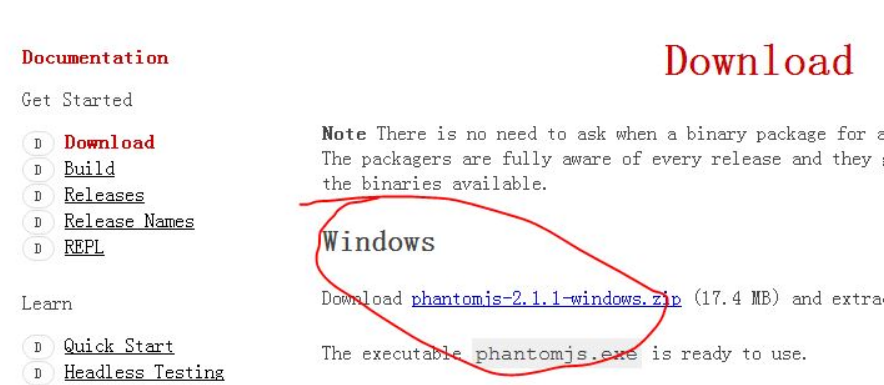
1.http://phantomjs.org/

下载windows版phantomjs

2.解压后bin目录下会有exe文件

40025-r9ul0icd84q.png

3.测试代码:

import org.openqa.selenium.WebDriver;
import org.openqa.selenium.firefox.FirefoxDriver;
import org.openqa.selenium.phantomjs.PhantomJSDriver;
public class test {

public static void main(String[] args) {
    // TODO Auto-generated method stub
//    System.setProperty("webdriver.gecko.driver", "C:\\Program Files (x86)\\Mozilla Firefox\\geckodriver.exe");
    System.setProperty("phantomjs.binary.path", "C:\\phantomjs-2.1.1-windows\\bin\\phantomjs.exe");
//    WebDriver driver = new FirefoxDriver();
    WebDriver driver = new PhantomJSDriver();
    driver.get("http://www.baidu.com");
    System.out.println(driver.getCurrentUrl());
    

}

}

4.url成功打印
28506-yyx8dzu2av.png

/**
 * 应用完全启动后, Spring执行自定义初始化 此处初始化避免了初始化static时 bean还没注入的问题
 */
spirng mvc xml 文件
<!-- spring环境都初始化完成后执行的一些操作 -->
<bean id="instantiationListener" class ="com.xxx.xxx.web.base.InstantiationListener" />


import org.slf4j.Logger; import org.slf4j.LoggerFactory; import org.springframework.beans.factory.InitializingBean; import org.springframework.beans.factory.annotation.Autowired; /** * 应用完全启动后, Spring执行自定义初始化 此处初始化避免了初始化static时 bean还没注入的问题 */ public class InstantiationListener implements InitializingBean { private static final Logger logger = LoggerFactory.getLogger(InstantiationListener.class); @Autowired private WechatAccessTokenService wechatAccessTokenService;// 这里注入不会有生存周期的问题 // ==>继承于InitializingBean 的afterPropertiesSet()方法是初始化方法. @Override public void afterPropertiesSet() { try { System.out.println("init.....初始化微信获取accessToken service...."); JwTokenAPI.wechatAccessTokenService = wechatAccessTokenService; //JwTokenAPI类的静态属性是wechatAccessTokenService } catch (Exception e) { logger.error("初始化微信获取accessToken service [wechatAccessTokenService] 异常"); } } }


免责声明
本博客部分内容来自于互联网,不代表作者的观点和立场,如若侵犯到您的权益,请联系[email protected]。我们会在24小时内进行删除。